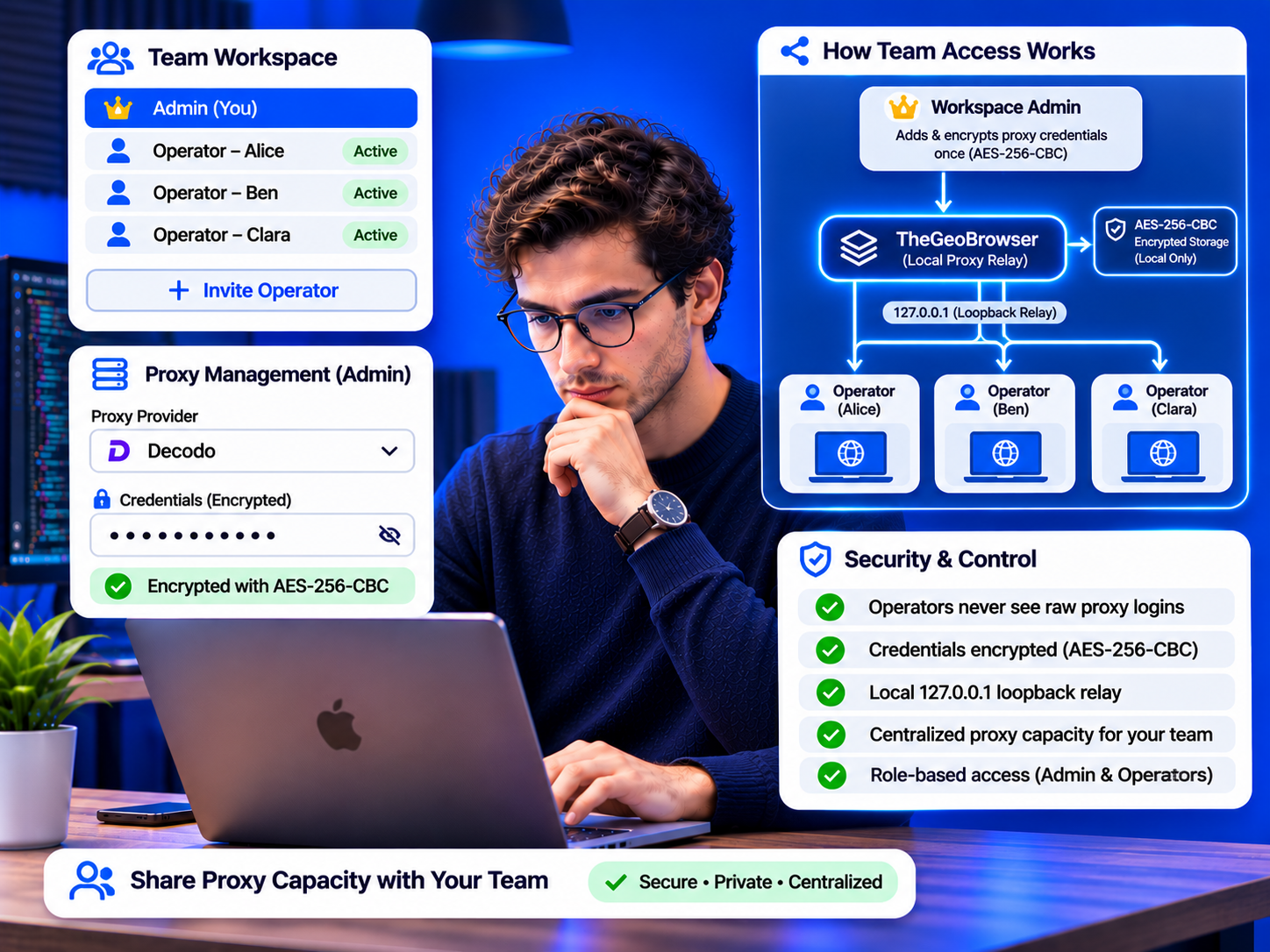
Share proxy capacity across your team without sharing passwords.
Workspace Admins encrypt proxy credentials once with AES-256-CBC. Invited Operators launch sessions via a local 127.0.0.1 loopback relay—never viewing or exporting raw logins.
Why Manual Workarounds Break — and How TheGeoBrowser Fixes It.
Where Conventional QA Struggles
- × Sharing raw Decodo or Bright Data proxy usernames/passwords over Slack or docs creates security and billing exposure.
- × Offboarding contractors or rotating proxy secrets across 10 laptops is error-prone and slows down QA sprints.
- × Uncontrolled concurrent launches on shared proxy endpoints cause IP collisions and rate-limit spikes.
Clean, Consistent Local Execution
- ✓ Admins store proxy host and credentials once inside the Workspace Vault encrypted at rest with AES-256-CBC.
- ✓ When an Operator launches a session, the Desktop App authenticates through a local `127.0.0.1` loopback relay so raw credentials never enter Chrome.
- ✓ Active member session leases (1 concurrent session per user) and free team invites keep shared workspace usage predictable.
- Target City
- Multi-Region Workspace Pool
- Device Viewport
- All Presets Unlocked
- Operating System
- Windows · macOS · Mobile
- Browser Engine
- Chrome · Edge · Brave
- Network Routing
- Encrypted Team BYOP Pool
“Keeping proxy credentials off Chrome and inside a local loopback relay gave our security review team the clean isolation policy they wanted.”
Launch Agency & Multi-Seat QA Workspaces in Seconds.
Configure Workspace Vault Once
Workspace Admins save Decodo, Bright Data, or custom proxy endpoints encrypted at rest and run live health checks.
Invite Operators via LinkedIn
Assign Pro seats (free team sharing) to QA engineers, ad-ops analysts, or compliance reviewers with instant access.
Launch Safely via Loopback Relay
Team members pick a city and device and launch isolated sessions—without ever seeing or exporting proxy passwords.
Related Use Cases
Cross-Device & OS Web QA
Launch isolated local Chrome, Edge, or Brave sessions configured with authentic desktop, mobile, and tablet viewports, OS profiles, and browser builds—without juggling virtual machines.
City Redirects & Localization
Audit geo-IP redirects, regional VAT/GST calculations, shipping rules, and localized storefront banners exactly as shoppers in Berlin, Paris, Tokyo, or New York experience them.
Ad Verification & Compliance
Confirm programmatic creatives, affiliate redirects, and regulated disclosures render properly in the exact cities and devices your campaigns target—without VPN footprints.

See the web
differently.
Simulate authentic user visits from any city, device, OS, and browser version. Start with 100 MB one-time free proxy data, or bring your own Decodo, Bright Data, or HTTP/HTTPS/SOCKS5 proxy on Pro.
- ✓ Windows 10/11 PC via Microsoft Store (macOS & Linux coming soon)
- ✓ Locally installed Chrome, Edge, or Brave for isolated real-browser sessions
- ✓ LinkedIn sign-in + BYOP proxy for Pro (100 MB one-time free proxy data included)
No unverified website binaries — always install from your official OS store.